Applications
In the Docker exercises part, you have built images for the Spring Boot app and pushed them to the local image store. We will now use those images - but this time from a public image registry - in order to run the App in K8s.
Before we start, let’s explain a little bit about some important objects in K8s that we will use in our next example: Secrets and ConfigMaps.
Secrets and ConfigMaps hold key-value pairs of configuration data that can be consumed in pods or used to store configuration data for system components such as controllers. They are similar except that Secrets are obfuscated with a Base64 encoding, thus more suitable for sensitive data.
Exercise - create a ConfigMap
First, let’s save the database name as a ConfigMap:
kubectl create configmap postgres-config --from-literal postgres.db.name=mydb
Milestone: K8S/APPS/CONFIGMAP
Now verify the contents of this ConfigMap:
kubectl get configmaps postgres-config -o jsonpath='{.data.postgres\.db\.name}'; echo
which should give you mydb. Alternatively, just run kubectl describe configmap postgres-config to check the data.
Exercise - create a Secret
Then, save the sensitive data as a Secret:
kubectl create secret generic db-security --from-literal db.user.name=matthias --from-literal db.user.password=password
(Please note that is is perfectly possible to adjust these credentials to your liking. However, doing so means we’d have to heed this adjustment in quite some places further below, so best refrain from any adjustments unless you are keen for some additional challenges.)
Milestone: K8S/APPS/SECRET
Now verify the contents of this Secret:
kubectl get secrets db-security -o jsonpath='{.data.db\.user\.password}' | base64 --decode; echo
which should give you password.
Exercise - analyze deployment yaml files
Make sure you are in the right directory before you move forward, as follows:
cd && git clone https://github.com/NovatecConsulting/technologyconsulting-containerexerciseapp.git
(this step is not needed if you have already cloned that data during the Docker Images exercises )
Milestone: K8S/APPS/GIT-CLONE
cd /home/novatec/technologyconsulting-containerexerciseapp
You will find a set of yaml files for the deployment of the application components, each containing a full analogue to what we can create on-the-fly on the command line, available for tracking in revision control like git.
ls -ltr *.yaml
which should give you:
$ ls -ltr *.yaml
-rw-rw-r-- 1 novatec novatec  784 Jan 28 09:58 postgres.yaml
-rw-rw-r-- 1 novatec novatec  136 Jan 28 09:58 postgres-service.yaml
-rw-rw-r-- 1 novatec novatec  166 Jan 28 09:58 postgres-pvc.yaml
-rw-rw-r-- 1 novatec novatec  435 Jan 28 09:58 postgres-pv.yaml
-rw-rw-r-- 1 novatec novatec 1111 Jan 28 09:58 postgres-import.yaml
-rw-rw-r-- 1 novatec novatec  449 Jan 28 09:58 postgres-fixdb.yaml
-rw-rw-r-- 1 novatec novatec  997 Jan 28 09:58 postgres-cleanup.yaml
-rw-rw-r-- 1 novatec novatec  374 Jan 28 09:58 docker-compose.yaml
-rw-rw-r-- 1 novatec novatec  524 Jan 28 09:58 todobackend.yaml
-rw-rw-r-- 1 novatec novatec  140 Jan 28 09:58 todobackend-service.yaml
-rw-rw-r-- 1 novatec novatec  362 Jan 28 09:58 todoui.yaml
-rw-rw-r-- 1 novatec novatec  133 Jan 28 09:58 todoui-service.yaml
-rw-rw-r-- 1 novatec novatec 2360 Jan 28 09:58 zookeeper-statefulset.yaml
-rw-rw-r-- 1 novatec novatec  355 Jan 28 09:58 zookeeper-services.yaml
Have a look at the deployment file for the UI:
cat todoui.yaml
$ cat todoui.yaml
apiVersion: apps/v1
kind: Deployment
metadata:
  name: todoui
spec:
  replicas: 1
  selector:
    matchLabels:
      app: todoui
  template:
    metadata:
      name: todoui
      labels:
        app: todoui
    spec:
      containers:
      - name: todoui
        image: novatec/technologyconsulting-containerexerciseapp-todoui:v0.1
      restartPolicy: Always
The essential information for you to take away for now is the name and the image. This will tell Kubernetes what to deploy and how to call it.
You can run this using:
kubectl apply -f todoui.yaml
Milestone: K8S/APPS/TODOUI
The overview of the deployment artifacts should now look like this:
$ watch -n1 kubectl get deployment,replicaset,pod
Every 1.0s: kubectl get deployment,replicaset,pod

NAME                     READY   UP-TO-DATE   AVAILABLE   AGE
deployment.apps/todoui   1/1     1            1           45s

NAME                                DESIRED   CURRENT   READY   AGE
replicaset.apps/todoui-5dd74fd4f5   1         1         1       45s

NAME                          READY   STATUS    RESTARTS   AGE
pod/todoui-5dd74fd4f5-55dzg   1/1     Running   0          45s
The content for the backend file looks equivalent.
Exercise - Complete the yaml file
The yaml file for the database requires some editing. Having the following postgresdb yaml file, please fill in the spaces (------) with the suitable content, in order to create a Deployment for the database.
Use:
nano postgres.yaml
Tip
If you are not familiar with using NANO as an editor, you can use [these instructions][nano-usage] to help you!
Alternative:
vim postgres.yaml
Tip
For VIM you can use the following [guide][vim-basics].
It is given to you in the following format. Try to fill out yourself or look at the solution below.
apiVersion: apps/v1
kind: ------
metadata:
  name: postgresdb
spec:
  replicas: 1
  selector:
    matchLabels:
      app: postgresdb
  template:
    metadata:
      labels:
        app: postgresdb
        tier: database
    spec:
      containers:
        - image: ------
          name: postgresdb
          env:
            - name: POSTGRES_USER
              valueFrom:
                secretKeyRef:
                  name: db-security
                  key: db.user.name
            - name: POSTGRES_PASSWORD
              valueFrom:
                secretKeyRef:
                  name: db-security
                  key: db.user.password
            - name: POSTGRES_DB
              valueFrom:
                configMapKeyRef:
                  name: postgres-config
key: postgres.db.nameAfter completion run the deployment:
kubectl apply -f postgres.yaml
Milestone: K8S/APPS/POSTGRES
Exercise - Complete deployment
Complete the deployment with the backend component:
kubectl apply -f todobackend.yaml
Milestone: K8S/APPS/TODOBACKEND
Exercise - Get YAML templates for deployment
You may wonder how you could know what to enter at all into such a YAML file containing resource definitions. kubectl to the rescue:
kubectl create deployment todoui --image novatec/technologyconsulting-containerexerciseapp-todoui:v0.1 -o yaml --dry-run=client
This will give you a template that you could then save to a file and adjust to your liking. For a full list of available option you’d have to consult the Kubernetes documentation , of course.
Exercise - Watch component resources
(In case your watch console is closed) Check the created resources and their status:
watch -n1 kubectl get deployments,replicasets,pods
Every 1.0s: kubectl get deployments,replicasets,pods

NAME                          READY   UP-TO-DATE   AVAILABLE   AGE
deployment.apps/postgresdb    1/1     1            1           59s
deployment.apps/todobackend   1/1     1            1           36s
deployment.apps/todoui        1/1     1            1           28s

NAME                                     DESIRED   CURRENT   READY   AGE
replicaset.apps/postgresdb-659bc489c6    1         1         1       59s
replicaset.apps/todobackend-56779cd459   1         1         1       36s
replicaset.apps/todoui-5dd74fd4f5        1         1         1       28s

NAME                               READY   STATUS    RESTARTS      AGE
pod/postgresdb-659bc489c6-t6l6z    1/1     Running   0             59s
pod/todobackend-56779cd459-gplng   1/1     Running   2 (18s ago)   36s
pod/todoui-5dd74fd4f5-r486j        1/1     Running   0             27s
Your todobackend Pod reports differently? Please just continue, we’ll get to that. ;-)
Exercise - Check status of components
Display some information about your created objects:
kubectl describe deployments todobackend
kubectl describe pods todobackend
After a while you will most likely notice that the Pod of todobackend will have many restarts and ends up either in Error or CrashLoopBackOff state:
NAME                           READY   STATUS             RESTARTS      AGE
postgresdb-659bc489c6-t6l6z    1/1     Running            0             3m2s
todobackend-56779cd459-gplng   0/1     CrashLoopBackOff   4 (30s ago)   2m39s
todoui-5dd74fd4f5-r486j        1/1     Running            0             2m30s
Tip
Custom sorting could help here as well, e.g. kubectl get pods --sort-by '.status.containerStatuses[0].restartCount'.
Checking the logs for the current backend Pod
kubectl logs todobackend-<ReplicaSetId>-<PodId>
and also for the previously running backend Pod
kubectl logs --previous todobackend-<ReplicaSetId>-<PodId>
(remember you can use TAB-completion for this, e.g. kubectl logs todobackend-<TAB>) you’ll find
2026-01-28T10:50:56.667Z  INFO 1 --- [           main] com.zaxxer.hikari.HikariDataSource       : HikariPool-1 - Starting...
2026-01-28T10:50:57.753Z ERROR 1 --- [           main] com.zaxxer.hikari.pool.HikariPool        : HikariPool-1 - Exception during pool initialization.

org.postgresql.util.PSQLException: The connection attempt failed.
[...]
Caused by: java.net.UnknownHostException: postgresdb
[...]
However, the postgresdb Pod is running just fine:
kubectl logs postgresdb-<ReplicaSetId>-<PodId>
You should see that the database has come up well:
2026-01-28 10:46:54.716 UTC [1] LOG:  listening on Unix socket "/var/run/postgresql/.s.PGSQL.5432"
2026-01-28 10:46:54.732 UTC [72] LOG:  database system was shut down at 2026-01-28 10:46:54 UTC
2026-01-28 10:46:54.741 UTC [1] LOG:  database system is ready to accept connections
Same goes for the UI Pod:
kubectl logs todoui-<ReplicaSetId>-<PodId>
2026-01-28T10:47:28.630Z  INFO 1 --- [           main] o.s.b.a.e.web.EndpointLinksResolver      : Exposing 13 endpoint(s) beneath base path '/actuator'
2026-01-28T10:47:28.750Z  INFO 1 --- [           main] o.s.b.w.embedded.tomcat.TomcatWebServer  : Tomcat started on port(s): 8090 (http) with context path ''
2026-01-28T10:47:28.778Z  INFO 1 --- [           main] io.novatec.todoui.TodouiApplication      : Started TodouiApplication in 6.111 seconds (process running for 6.966)
Exercise - Check networking
What the logs don’t necessarily indicate is whether the individual containers can actually see each other as they should. And in fact they cannot, at least for now. To check this execute
kubectl exec deployment/todoui -- nc -v -z postgresdb 5432
which should yield
nc: bad address 'postgresdb'
command terminated with exit code 1
This means that the todoui pod cannot reach or find the database using that name. Not because it is not running properly, but rather it can’t even find the container where it is supposed to run in.
Info
nc or netcat is used in zero-IO mode (-z) solely for scanning whether on the specified host postgresdb the
specified port 5432 is reachable, yielding verbose (-v) output, and the whole command is to be executed from the
todoui Pod, with the netcat command being separated by -- from the kubectl command to clarify that everything that
follows is not part of the kubectl command parameters anymore.
This is a similar scenario as in the container exercises when you ran the apps without a network. Kubernetes already has a network, and the containers are already able to contact themselves individually using their name, for instance
kubectl exec deployment/todoui -- nc -v -z todoui-<ReplicaSetId>-<PodId> 8090
which should yield e.g.
todoui-5dd74fd4f5-r486j (10.244.0.46:8090) openand the containers are able to contact individual other containers using their private IP address, cf.
kubectl get pod postgresdb-<ReplicaSetId>-<PodId> -o jsonpath='{.status.podIP}'; echo # determine PostgresIP for the next command
kubectl exec deployment/todoui -- nc -v -z <PostgresIP> 5432
which at the end should yield e.g.
10.244.0.44 (10.244.0.44:5432) openbut for full networking with working DNS names and automatic load balancing / failover you need to expose the workloads to the network.
Find out how in the next chapter. Leave the components running as they are, as this will recover once it is configured correctly.
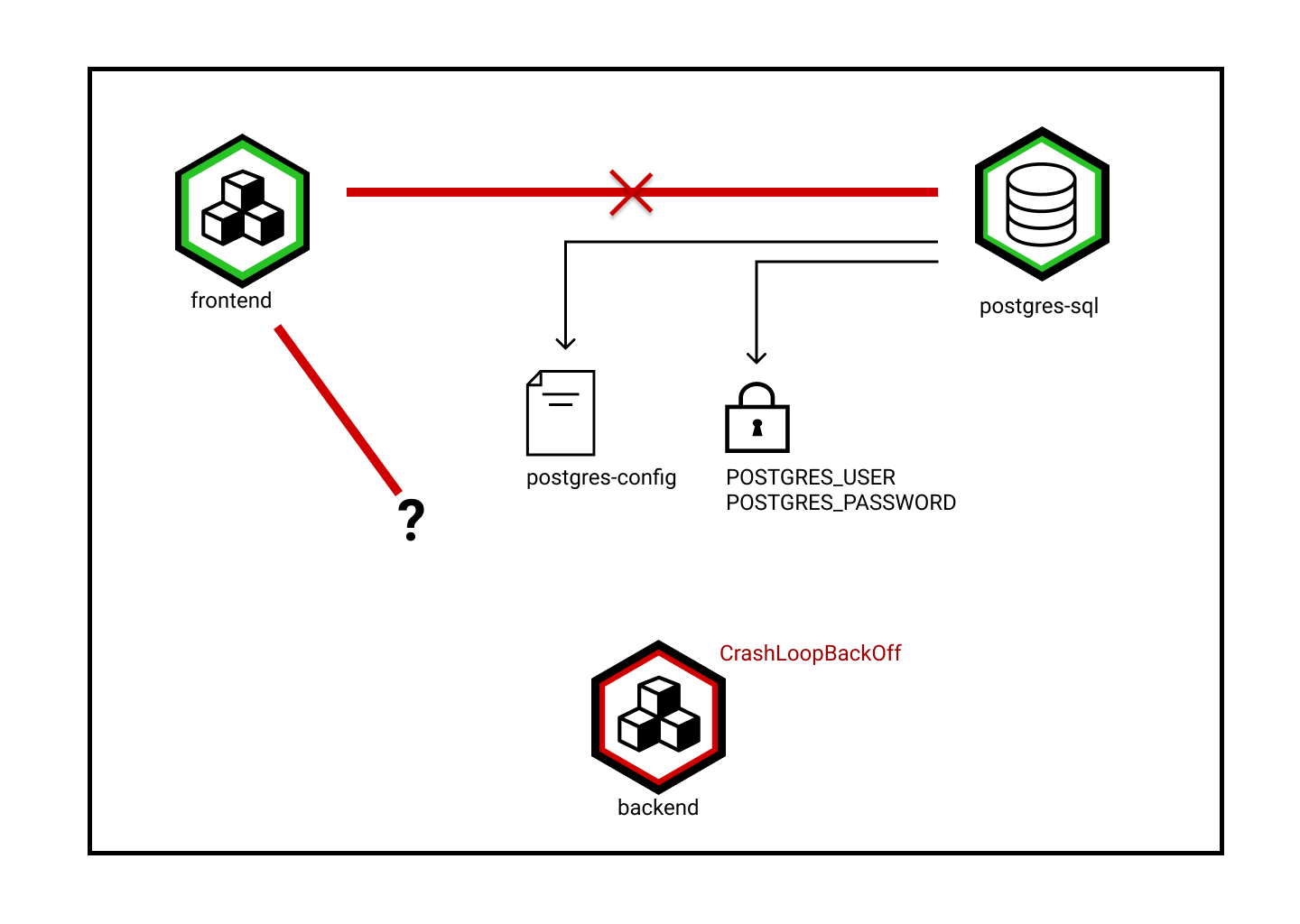
For now we have checked database connectivity from the todoui pod. This is somewhat strange as the UI frontend should not need to connect to the database, but rather it is only the backend which should connect the database. Why do you think this was done here?
Solution
The todobackend pod might simply still be crashed or crashing while we run our check, which is why we conduct the database connectivity check from the todoui instead. This is shown in the diagram below.